Alarm Crypto is a crypto alarm app that monitors cryptocurrency prices in real time and notifies you the moment a price hits the value you set. The promise is simple: you stop checking quotes ten times a day, and the app only calls you when something you flagged as important actually happens.
This guide covers the full path — from your first alarm to the settings almost nobody adjusts, the ones that decide whether the app stays useful or becomes another stream of ignored notifications.
What is Alarm Crypto?
Alarm Crypto is a cryptocurrency price alert app connected to 6 exchanges in real time: Binance, Coinbase, Kraken, Bybit, Bitget and MEXC. You set alarms for any cryptocurrency and get a push notification the moment your target is hit.
Two differences matter in practice. First: monitoring runs on the server, not on your phone — which is why the alarm fires even with the app closed, the screen locked, and the system saving battery. Second: the app treats an alarm as an alarm, with a loud sound and its own volume, instead of a regular notification lost in the queue next to group chats.
If you're new to the product and want the overview before the walkthrough, read what Alarm Crypto is.
Step by step: creating your first alarm
Download the app and create an account
Download Alarm Crypto from Google Play and sign in with your email. Signup takes under a minute and you start with a trial period to try every feature, with no card required.
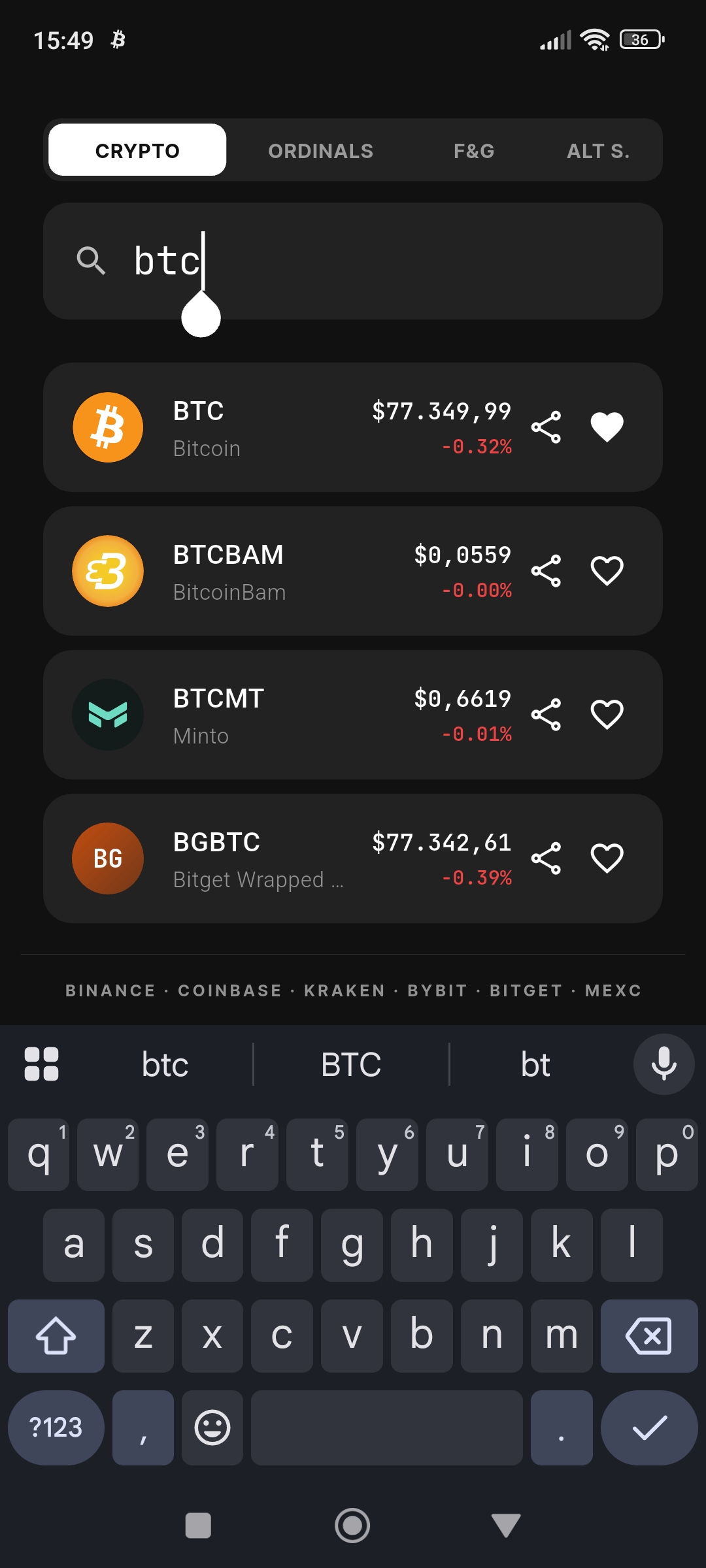
Search for the cryptocurrency
On the home screen, use the search bar to find any cryptocurrency — Bitcoin (BTC), Ethereum (ETH), Solana (SOL), Dogecoin (DOGE), and 2,400+ available tokens. Just type the coin's name or symbol. For a hands-on example focused on ETH, see the tutorial on how to set up Ethereum price alerts on your phone.
Set the target price
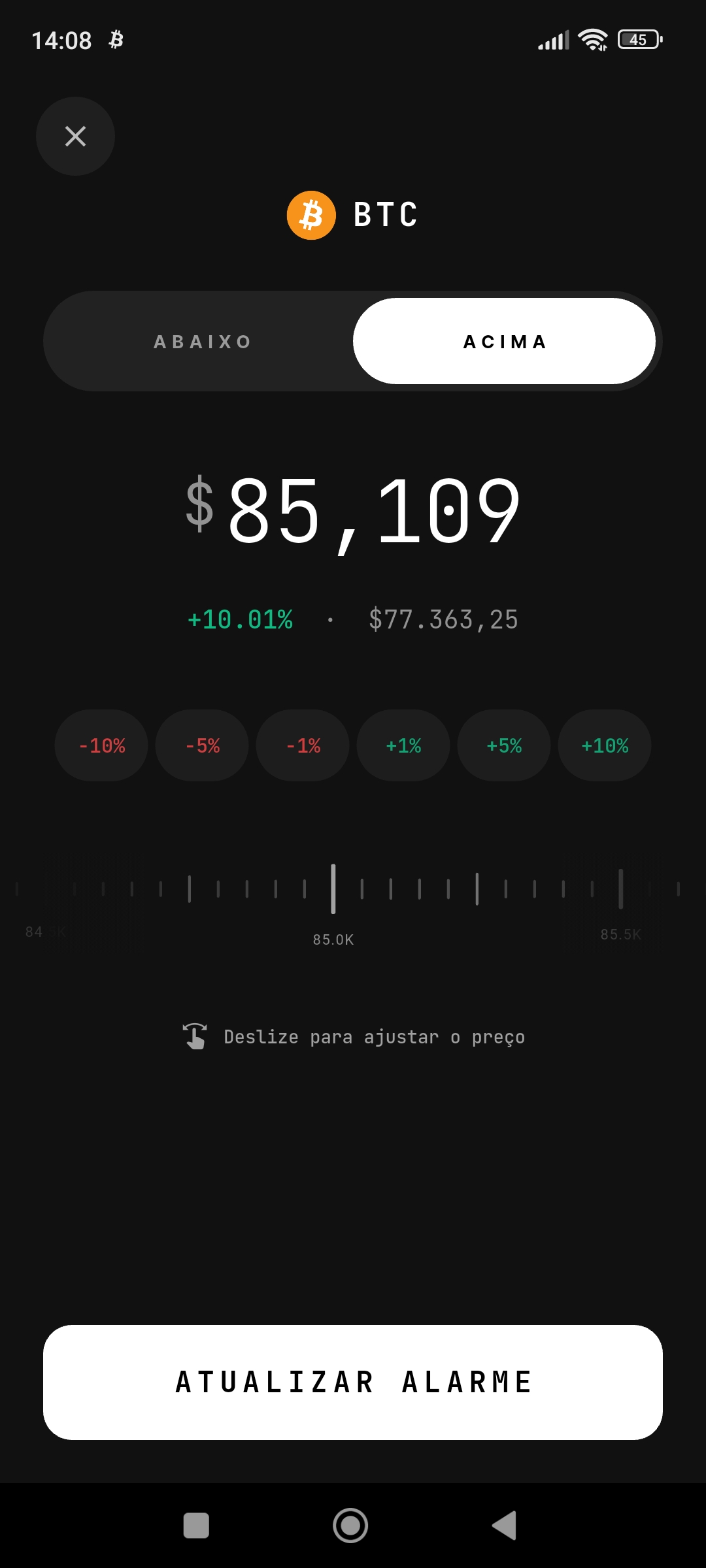
Choose whether you want to be alerted when the price goes above or below your value. Type the target and confirm. The app shows the live price so you can check the distance before saving — a detail that prevents the most common mistake of all, setting a trigger glued to the current price.
Tune sound, volume and priority
Before saving, pick the alarm sound and volume. Save the loudest sound for alarms that demand action (a planned buy, a sell target) and a discreet one for informational alerts. This is the adjustment that stops the app from becoming uniform noise, where everything shouts equally and you end up ignoring all of it.
Get the notification
That's it. When the price hits your target, you receive an instant push notification with alarm sound, even if the app is closed. From then on, watching the screen is the app's job, not yours.
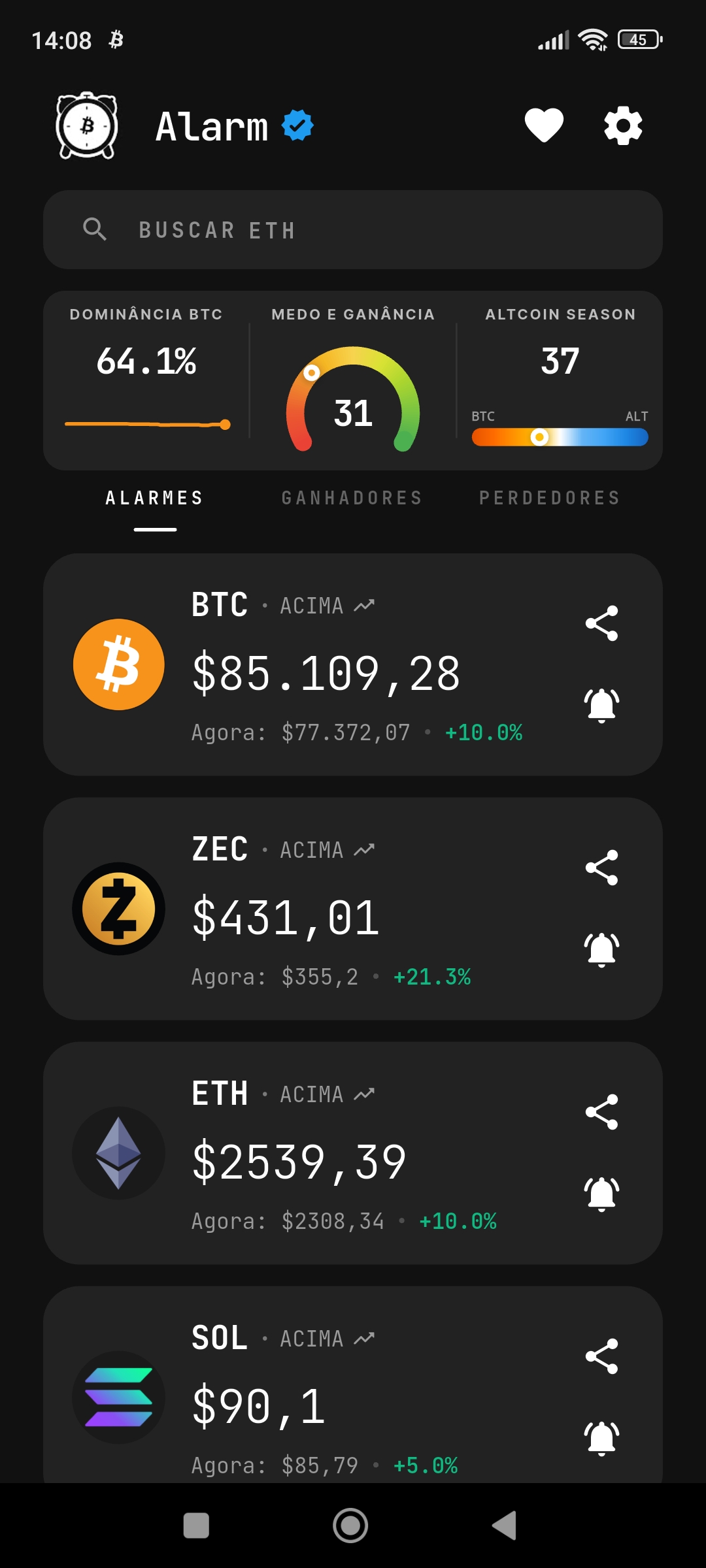
The alarm types and when to use each
Picking the right type is half the result. There are three:
- Price above. Fires when the coin rises and crosses your value. Good for profit-taking targets, resistance breakouts, and strength confirmation.
- Price below. Fires when price drops to your value. It's the opportunity alarm (the price you'd buy at) and the risk one too — it works as a manual stop for anyone holding crypto in self-custody with no automatic stop-loss.
- Percentage change. Fires when the coin moves a defined percentage within a time window, say 5% in 24 hours. This one doesn't require you to guess a number: it captures abnormal movement wherever it comes from, which makes it ideal for overnight hours and macro events.
To choose the value for each trigger without guessing round numbers, the method is laid out in how to set Bitcoin price alerts — it works for any coin.
Which exchanges does Alarm Crypto monitor?
The app monitors 6 exchanges simultaneously, covering the vast majority of cryptocurrencies on the market:
- Binance — the world's largest exchange
- Coinbase — popular in the US and Europe
- Kraken — regulated exchange
- Bybit — popular for trading
- Bitget — fast-growing
- MEXC — widest altcoin variety
Watching several sources at once isn't a technical detail: a move usually starts on one exchange before the others, and an alert tied to a single order book arrives late. That's the difference explained in Binance alerts vs a dedicated app.
Beyond price: the market indexes
The app also tracks indicators that help you read the market's mood, not just a coin's number:
- Fear & Greed Index — measures market sentiment on a 0 to 100 scale. Extremes tend to mark interesting moments; how it works is in what the Fear and Greed Index is.
- Altcoin Season Index — shows whether money is concentrated in Bitcoin or rotating into altcoins. Explained in Altcoin Season Index: what it is and how it works.
- Top gainers and losers — the coins that moved most in the period, useful for spotting what's out of the ordinary without scanning the whole list.
For every alarm you create, mentally finish the sentence: "when the price hits X, I do Y." If you can't finish the Y, don't create the alarm — it will only consume your attention.
Settings almost nobody adjusts (but should)
- Battery optimization. On Android, the system can delay notifications from apps it considers idle. In your phone's settings, mark Alarm Crypto as unrestricted. It's the single adjustment that resolves most "the alarm didn't ring" cases.
- Quiet hours. Set a window where low-priority alarms don't wake you — and keep the critical ones outside it. That way you sleep without switching the whole app off.
- The alarm's own volume. The alarm doesn't depend on the system notification volume. Adjust it in the app to make sure it cuts through silent mode when it needs to.
- Notification language. The warning text is composed inside the app, so it follows the language you picked in settings.
Mistakes that turn the app into noise
- An alarm glued to the current price. A trigger 1% away fires today and tells you nothing new.
- Twenty active alarms at once. Excess becomes clutter, and clutter makes you ignore the one warning that mattered.
- All of them with the same sound. If everything shouts equally, nothing is urgent.
- Never reviewing the list. An alarm created three months ago may be 40% away from price and never fire again. Five minutes a week fixes it.
Frequently asked questions
Do I need to keep the app open for alarms to work?
No. Monitoring runs on the server, not on your phone. The notification arrives with a loud sound even with the app closed and the screen locked — which is exactly why it lets you stop watching the chart.
Does the alarm ring when the phone is on silent?
The alarm has its own volume, separate from the system notification volume, and it's built to actually get your attention. It's worth setting the volume in the app and clearing battery optimization to guarantee the behavior in every scenario.
How many alarms can I have?
During the trial you can create far more alarms than you need, so you can explore freely. After that, the number of active alarms depends on your plan — but in practice most people do well with two to four per coin: one buy, one sell, one risk level.
Which cryptocurrencies does it work with?
Over 2,400 tokens, including Bitcoin, Ethereum, Solana, XRP, Dogecoin and most altcoins listed on the 6 monitored exchanges. To build a watchlist that doesn't turn into clutter, see how to build your crypto watchlist.
I already use alarms in another app. Can I migrate?
You can, without retyping everything. The import process is described in how to import alarms into Alarm Crypto.
Conclusion
Using Alarm Crypto well is less about creating many alarms and more about creating the right ones: the type that matches what you want to capture, a value tied to a real level, a sound proportional to the urgency, and a weekly review so the list doesn't go stale. Do that and the app delivers what it promises — your attention back, and a call only when there's something to do.
If you still have specific questions, the FAQ page has detailed answers about how it works, plans, and notifications. And to turn alarms into strategy, start with the best price alarm strategies.